


RFID-powered operational efficiency platform
Design of an operational management system for retail stores and warehouses to synchronize goods receiving, dispatches, and inventory in real time
Duration 2023 - 2026
Product design
Design system
RFID Scanner app
Employee experience
Context
The digital transformation of retail has created a paradox: while consumers expect increasingly faster, personalised, and omnichannel experiences, much of the in-store operations still rely on manual processes, disconnected tools, and unreliable data.
Brands need their teams to be able to locate products, manage inventories, assist customers, and make operational decisions in real time, without increasing the complexity of their daily work.
Store operations work blindly
Store and warehouse employees managed receipts, dispatches, and inventories with manual or barcode processes: slow, with a high error rate and no real-time visibility. The management team could not rely on stock data to make business decisions.
65%
Inventory accuracy without RFID
1x
Receiving speed with barcode
High
Error rate in shipments
None
Synchronization between store, warehouse, and online
So from Jogo it was proposed:
¿Cómo podríamos ayudar a los equipos a mejorar la gestión de operaciones diarias en almacen y tienda?
Users
Who uses the system and in what context


Store employee
Works in the sales floor and store warehouse. Receives merchandise, processes returns, and locates products for customers.

Need
Confirm receipts, check stock by size and area, and quickly record exits, even during peak times.

Warehouse operator
Manages incoming and outgoing parcels in the central or logistics warehouse. Works with high volumes and tight deadlines.

Need
Read hundreds of items without opening boxes, detect discrepancies with the delivery note instantly, and validate shipments without errors. Reduce steps and ensure usability without extensive training.

Manager
Supervises store performance. Checks inventory results, analyses losses, and makes decisions about replenishment.
Need
View inventory status in real-time, identify anomalies, and assess losses without relying on sporadic manual counts.
Designed solution
An ecosystem of two synchronised surfaces
The design integrates the Zebra RFD2000 RFID gun —the capture hardware— with a mobile staff app. Every operation performed with the gun is immediately reflected in the app and vice versa: if there is a truck awaiting reception, it appears on both interfaces.


RFID reader
Zebra RFD2000 Lectura de campo

Real-time synchronisation
Staff app
Supervisión y validación

Receipts
Reading packages without opening boxes. Automatic comparison against the delivery note. Detection of shortages, surpluses, and items not on the delivery note.
Mobile
Staff app


Outs
Validation of the outgoing delivery note before dispatch. Grouping by status: read, pending, not on delivery note.
RFID gun
Staff app


Micro-inventory
Inventory by zones. Allows frequent partial counts without halting the store.
RFID gun
Staff app

General inventory
Global count. Summary of readings with current stock, scanned items, and anomalies. The analysis is available in the app to assess losses.
RFID gun
Staff app

Stock
Instant query by EAN. Stock view by size, store, warehouse, and online on a single screen.
Staff app

Locate
Allows finding a specific item in the room or warehouse through proximity via RFID.
RFID gun
Design decisions
Not all design decisions come from a brief. Some arose from observing how employees worked, identifying frictions that had not yet been named, and proposing solutions before they became major problems.
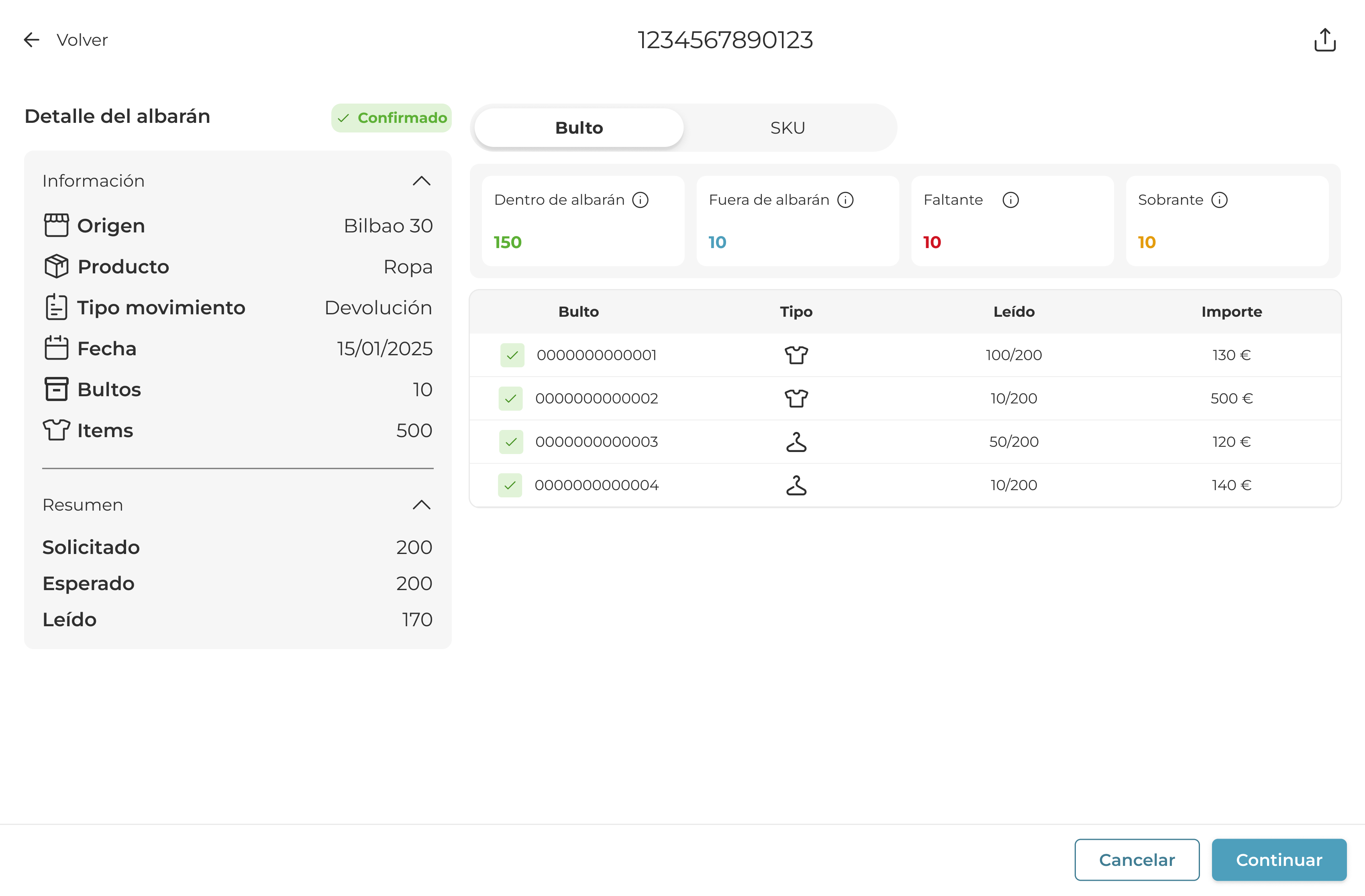
Delivery note details at two levels
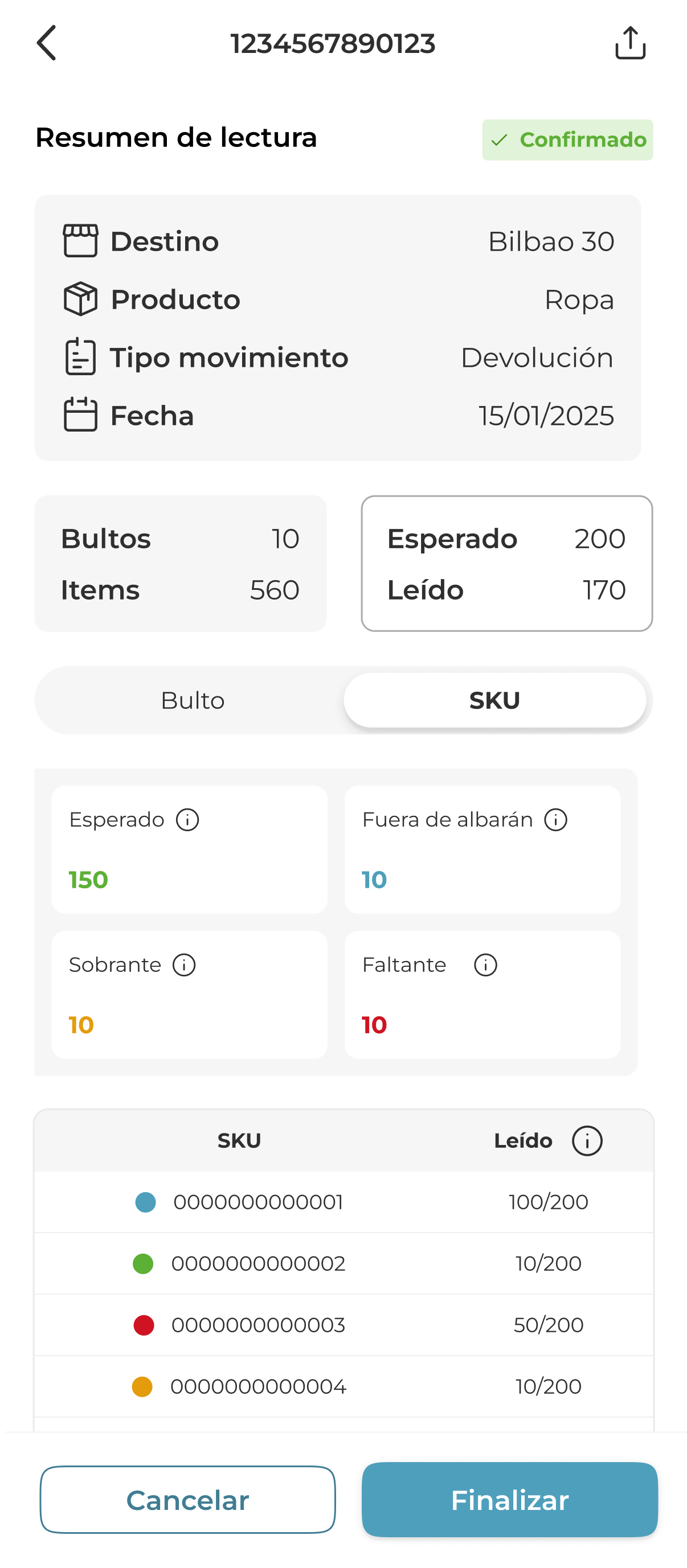
A detailed view that works both by bulk and by SKU, with a drill-down modal. The manager can see the status of each individual unit without leaving the context of the main delivery note.
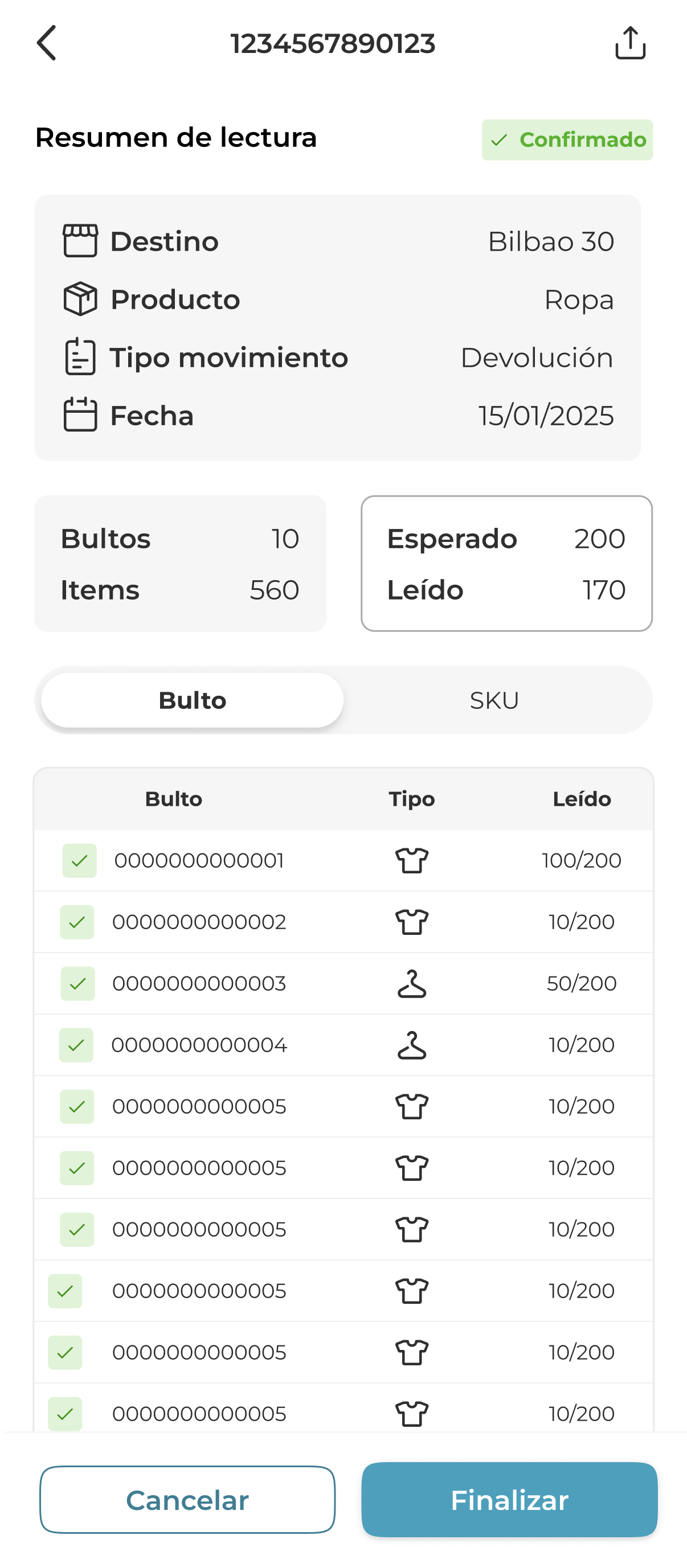
Reading Information
During the design, we found that employees had difficulties distinguishing the different states of a reading: what was correct, what was missing, what was excess, and what was outside the delivery note. I designed a state system with clear visual semantics (colour, iconography, and explicit labeling) so that any operator could identify discrepancies at a glance, without the need for prior training.
Expected
200
The total number of units you expected to receive in your delivery note
Total Read
170
Within the delivery note
150
The total number of read units that match the delivery note
Outside the delivery note
10
The total number of units you read but you didn’t expected in your delivery note.
Excess
10
Extra units. These SKUs were expected, but more units than stated in the delivery note have been sent.
Missing
50
The total number of units you expected in your delivery note but have not read.
Inventory as an analytical tool
Una vista de detalle que funciona tanto por bulto como por SKU, con un modal de drill-down. El manager puede ver el estado de cada unidad individual sin salir del contexto del albarán principal.

Pending tasks as design decisions, not as features
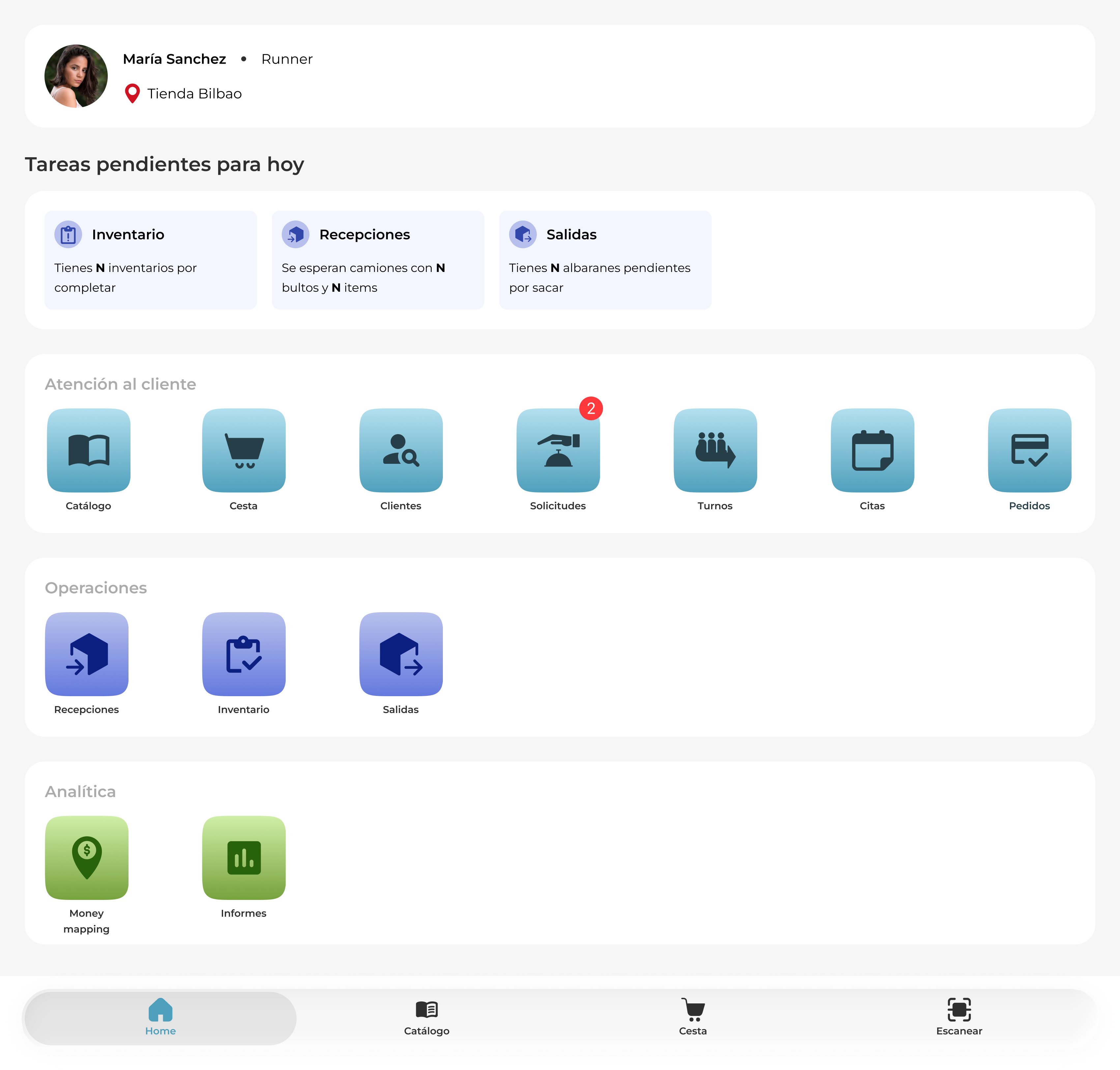
During the process, we identified a recurring operational issue: employees were receiving goods before completing the opening inventory, which introduced errors in stock that were difficult to trace later. The order of operations mattered, but the application did not communicate this.
The decision was made to include a block of pending tasks for the day on the home screen of the staff app, sorted by operational priority. Thus, if there is an opening inventory pending, it is highlighted before any other task—even if there is a truck waiting. The app does not block the employee, but it does provide clear context on what they should do first and what remains to be completed.
My contribution
Arquitectura del sistema
I defined the model of two surfaces (gun + app), the synchronization of states, and the hierarchy of modules from scratch.
Design of the operational flow
I mapped the processes of reception, dispatch, and inventory to reduce steps and errors in high-pressure contexts with low visual attention.
Hardware UI (gun)
I designed the interface of the gun app considering use with gloves, poor lighting, and the need for immediate feedback on each scan.
Staff App
I designed the screens for receptions, dispatches, and inventory for the management app, with actionable summaries and detailed delivery notes by package and SKU.
State and anomaly system
I designed the visual model of states (complete / incomplete / out of delivery note / anomaly) consistent across both surfaces so that any employee can interpret it without training.
Executive presentation
I designed the narrative and slides for Module 2 to communicate the product's value to non-technical stakeholders.
RFID-powered operational efficiency platform
Design of an operational management system for retail stores and warehouses to synchronize goods receiving, dispatches, and inventory in real time
Duration 2023 - 2026
Product design
Design system
RFID Scanner app
Employee experience
Context
The digital transformation of retail has created a paradox: while consumers expect increasingly faster, personalised, and omnichannel experiences, much of the in-store operations still rely on manual processes, disconnected tools, and unreliable data.
Brands need their teams to be able to locate products, manage inventories, assist customers, and make operational decisions in real time, without increasing the complexity of their daily work.
Store operations work blindly
Store and warehouse employees managed receipts, dispatches, and inventories with manual or barcode processes: slow, with a high error rate and no real-time visibility. The management team could not rely on stock data to make business decisions.
65%
Inventory accuracy without RFID
1x
Receiving speed with barcode
High
Error rate in shipments
None
Synchronization between store, warehouse, and online
So from Jogo it was proposed:
¿Cómo podríamos ayudar a los equipos a mejorar la gestión de operaciones diarias en almacen y tienda?
Users
Who uses the system and in what context
Store employee
Operates in the sales floor and store warehouse. Receives goods, processes returns, and locates products for customers.
Need
Confirm receipts, check stock by size and area, and quickly record exits, even during peak times.
Warehouse operator
Manages incoming and outgoing parcels in the central or logistics warehouse. Works with high volumes and tight deadlines.

Need
Read hundreds of items without opening boxes, instantly detect discrepancies with the delivery note, and validate shipments without errors. Reduce steps and ensure usability without extensive training.
Manager
Supervises store performance. Checks inventory results, analyses losses, and makes decisions about replenishment.
Need
View inventory status in real-time, identify anomalies, and assess losses without relying on sporadic manual counts.
Designed solution
An ecosystem of two synchronised surfaces
The design integrates the Zebra RFD2000 RFID gun — the capture hardware — with a mobile staff app. Every operation performed with the gun is immediately reflected in the app and vice versa: if there is a truck awaiting reception, it appears on both surfaces.
RFID reader
Zebra RFD2000
Field reading

Real-time synchronisation
Staff app
Supervision
and validation
Receipts
Reading packages without opening boxes. Automatic comparison against the delivery note. Detection of shortages, surpluses, and items not on the delivery note.
RFID gun
Staff app
Outs
Validation of the outgoing delivery note before dispatch. Grouping by status: read, pending, not on delivery note.
RFID gun
Staff app
Micro-inventory
Inventory by zones. Allows frequent partial counts without halting the store.
RFID gun
Staff app
General inventory
Global count. Summary of readings with current stock, scanned items, and anomalies. The analysis is available in the app to assess losses.
RFID gun
Staff app
Stock
Instant query by EAN. Stock view by size, store, warehouse, and online on a single screen.
Staff app
Locate
Allows finding a specific item in the room or warehouse through proximity via RFID.
RFID gun
Design decisions
Not all design decisions come from a brief. Some arose from observing how employees worked, identifying frictions that had not yet been named, and proposing solutions before they became major problems.
Delivery note details at two levels
A detailed view that works both by bulk and by SKU, with a drill-down modal. The manager can see the status of each individual unit without leaving the context of the main delivery note.
Reading Information
During the design, we found that employees had difficulties distinguishing the different states of a reading: what was correct, what was missing, what was excess, and what was outside the delivery note. I designed a state system with clear visual semantics (colour, iconography, and explicit labeling) so that any operator could identify discrepancies at a glance, without the need for prior training.
Expected
200
The total number of units you expected to receive in your delivery note
Total Read
170
Within the delivery note
150
The total number of read units that match the delivery note
Outside the delivery note
10
The total number of units you read but you didn’t expected in your delivery note.
Excess
10
Extra units. These SKUs were expected, but more units than stated in the delivery note have been sent.
Missing
50
The total number of units you expected in your delivery note but have not read.
Inventory as an analytical tool
A detailed view that works both by bulk and by SKU, with a drill-down modal. The manager can see the status of each individual unit without leaving the context of the main delivery note.
Pending tasks as design decisions, not as features
During the process, we identified a recurring operational issue: employees were receiving goods before completing the opening inventory, which introduced errors in stock that were difficult to trace later. The order of operations mattered, but the application did not communicate this.
The decision was made to include a block of pending tasks for the day on the home screen of the staff app, sorted by operational priority. Thus, if there is an opening inventory pending, it is highlighted before any other task—even if there is a truck waiting. The app does not block the employee, but it does provide clear context on what they should do first and what remains to be completed.
My contribution
System architecture
I defined the model of two surfaces (gun + app), the synchronisation of states, and the hierarchy of modules from scratch.
Design of the operational flow
I mapped the processes of reception, dispatch, and inventory to reduce steps and errors in high-pressure contexts with low visual attention.
Hardware UI (gun)
I designed the interface of the gun app considering use with gloves, poor lighting, and the need for immediate feedback on each scan.
Staff App
I designed the screens for receptions, dispatches, and inventory for the management app, with actionable summaries and detailed delivery notes by package and SKU.
State and anomaly system
I designed the visual model of states (complete / incomplete / out of delivery note / anomaly) consistent across both surfaces so that any employee can interpret it without training.
Executive presentation
I designed the narrative and slides for Module 2 to communicate the product's value to non-technical stakeholders.
RFID-powered operational efficiency platform
Design of an operational management system for retail stores and warehouses to synchronize goods receiving, dispatches, and inventory in real time
Duration 2023 - 2026
Product design
Design system
RFID Scanner app
Employee experience
Context
The digital transformation of retail has created a paradox: while consumers expect increasingly faster, personalised, and omnichannel experiences, much of the in-store operations still rely on manual processes, disconnected tools, and unreliable data.
Brands need their teams to be able to locate products, manage inventories, assist customers, and make operational decisions in real time, without increasing the complexity of their daily work.
Store operations work blindly
Store and warehouse employees managed receipts, dispatches, and inventories with manual or barcode processes: slow, with a high error rate and no real-time visibility. The management team could not rely on stock data to make business decisions.
65%
Inventory accuracy without RFID
1x
Receiving speed with barcode
High
Error rate in shipments
None
Synchronization between store, warehouse, and online
So from Jogo it was proposed:
How could we help teams improve the management of daily operations in the warehouse and store?
Users
Who uses the system and in what context

Store employee
Operates in the sales area and store warehouse. Receives goods, manages receipts, returns, and locates products for customers.

Need
Confirm receipts, check stock by size and area, and quickly record exits, even during peak times.

Warehouse operator
Manages incoming and outgoing parcels in the central or logistics warehouse. Works with high volumes and tight deadlines.
Need
Read hundreds of items without opening boxes, detect discrepancies with the delivery note instantly, and validate shipments without errors. Reduce steps and ensure usability without extensive training.

Manager
Supervises store performance. Checks inventory results, analyses losses, and makes decisions about replenishment.
Need
View inventory status in real-time, identify anomalies, and assess losses without relying on sporadic manual counts.
Designed solution
An ecosystem of two synchronised surfaces
The design integrates the Zebra RFD2000 RFID gun —the capture hardware— with a staff app. Every operation performed with the gun is immediately reflected in the staff app and vice versa: if there is a truck pending reception, it appears on both devices.

RFID reader
Zebra RFD2000
Field reading

Real-time synchronisation

Staff app
Supervision
and validation
Receipts
Reading packages without opening boxes. Automatic comparison against the delivery note. Detection of shortages, surpluses, and items not on the delivery note.
RFID gun
Staff app


Outs
Validation of the outgoing delivery note before dispatch. Grouping by status: read, pending, not on delivery note.
RFID gun
Staff app
Micro-inventory
Inventory by zones. Allows frequent partial counts without halting the store.
RFID gun
Staff app

General inventory
Global count. Summary of readings with current stock, scanned items, and anomalies. The analysis is available in the app to assess losses.
RFID gun
Staff app

Stock
Instant query by EAN. Stock view by size, store, warehouse, and online on a single screen.
Staff app
Locate
Allows finding a specific item in the room or warehouse through proximity via RFID.
RFID gun
Design decisions
Not all design decisions come from a brief. Some arose from observing how employees worked, identifying frictions that had not yet been named, and proposing solutions before they became major problems.
Delivery note details at two levels
A detailed view that works both by bulk and by SKU, with a drill-down modal. The manager can see the status of each individual unit without leaving the context of the main delivery note.
Reading Information
During the design, we found that employees had difficulties distinguishing the different states of a reading: what was correct, what was missing, what was excess, and what was outside the delivery note. I designed a state system with clear visual semantics (colour, iconography, and explicit labeling) so that any operator could identify discrepancies at a glance, without the need for prior training.
Expected
200
The total number of units you expected to receive in your delivery note
Total Read
170
Within the delivery note
150
The total number of read units that match the delivery note
Outside the delivery note
10
The total number of units you read but you didn’t expected in your delivery note.
Excess
10
Extra units. These SKUs were expected, but more units than stated in the delivery note have been sent.
Missing
50
The total number of units you expected in your delivery note but have not read.
Inventory as an analytical tool
The result of the inventory in the staff app is not just a number: it displays the grouped anomalies ("Out of stock") so that the manager can assess losses and make restocking decisions.
Pending tasks as design decisions, not as features
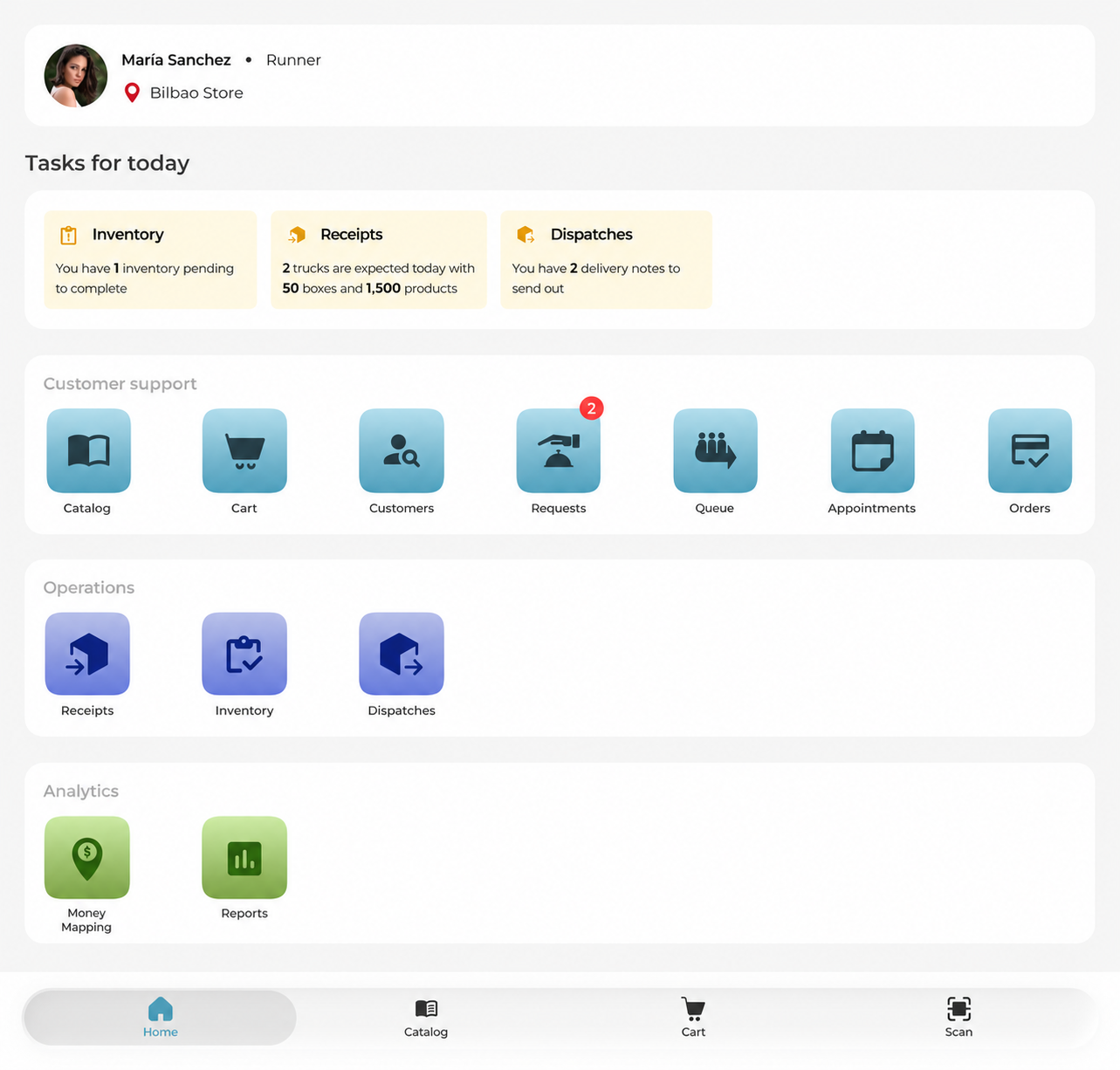
During the process, we identified a recurring operational issue: employees were receiving goods before completing the opening inventory, which introduced errors in stock that were difficult to trace later. The order of operations mattered, but the application did not communicate this.
The decision was made to include a block of pending tasks for the day on the home screen of the staff app, sorted by operational priority. Thus, if there is an opening inventory pending, it is highlighted before any other task—even if there is a truck waiting. The app does not block the employee, but it does provide clear context on what they should do first and what remains to be completed.
My contribution
System architecture
I defined the model of two surfaces (gun + app), the synchronization of states, and the hierarchy of modules from scratch.
Design of the operational flow
I mapped the processes of reception, dispatch, and inventory to reduce steps and errors in high-pressure contexts with low visual attention.
Hardware UI (gun)
I designed the interface of the gun app considering use with gloves, poor lighting, and the need for immediate feedback on each scan.
Staff App
I designed the screens for receptions, dispatches, and inventory for the management app, with actionable summaries and detailed delivery notes by package and SKU.
State and anomaly system
I designed the visual model of states (complete / incomplete / out of delivery note / anomaly) consistent across both surfaces so that any employee can interpret it without training.
Executive presentation
I designed the narrative and slides for Module 2 to communicate the product's value to non-technical stakeholders.